aisleful / professional

From enquiry to thank‑yous.

  • Leads, proposals and payments
  • A private view for each couple
  • Day-of mode on your phone
The same wedding twice. The couple's portal shows their checklist, next task, shared contract and a message. Your workspace adds what they never see: what is owed, overdue tasks, your private notes and your other weddings.
Move over their view to see yours

Open wedding Example

Hannah and Matthew
The Boathouse
14 June, 112 guests

72%

This season Example

Weddings
7
Leads
3
Owed
£3.6k

Your season at a glance.

Every wedding you run on one year planner. Booked dates fill in, enquiries wait in outline. Point at a day to read it.

WeddingEnquiryExample data

Pro / 10

7 of 10
running at once
£3,600
outstanding
3
enquiries open
Example season: weddings and enquiries
CoupleDateVenue or stage
Amira and Luke10 AprilRegistry office, then a restaurant
Ana and Felix1 MayNew enquiry
Marcus and Dee22 MayHollins Barn
Hannah and Matthew14 JuneThe Boathouse
Lily and Kit26 JuneConsultation
Grace and Idris10 JulyThe walled garden
Priya and Tom1 AugustFell House
Chloe and Ben5 SeptemberMarquee at home
Ella and Jo18 SeptemberBrockhole
Nadia and Rob9 OctoberProposal sent

One booking, start to finish.

The work you do for a client runs in this order, and Aisleful follows it. Each stage picks up where the last one stopped, and the couple is part of it from the proposal on.

01 Enquiry

The first message

An enquiry arrives and is not lost.

Log the lead with the date, the venue they have in mind and what they said, then move it along the pipeline from New to Booked. When they say yes, converting copies the names, date, venue, guest estimate, budget, package and notes into a new wedding. Nothing is typed twice.

  • YouEvery lead with its stage and the next call to make.
  • ClientA reply that comes from you, not from a form.
02 Proposal

The proposal

A proposal that turns into a payment plan.

Set out what you will do and what it costs. When the couple accepts, their choice and the total are recorded. Then split the total into the payments you want, with a deposit, instalments and due dates, and every invoice is one click away.

  • YouWho has paid, who is late and what is coming in this month.
  • ClientOne page with the scope, the price and when each payment falls due.

03 Planning

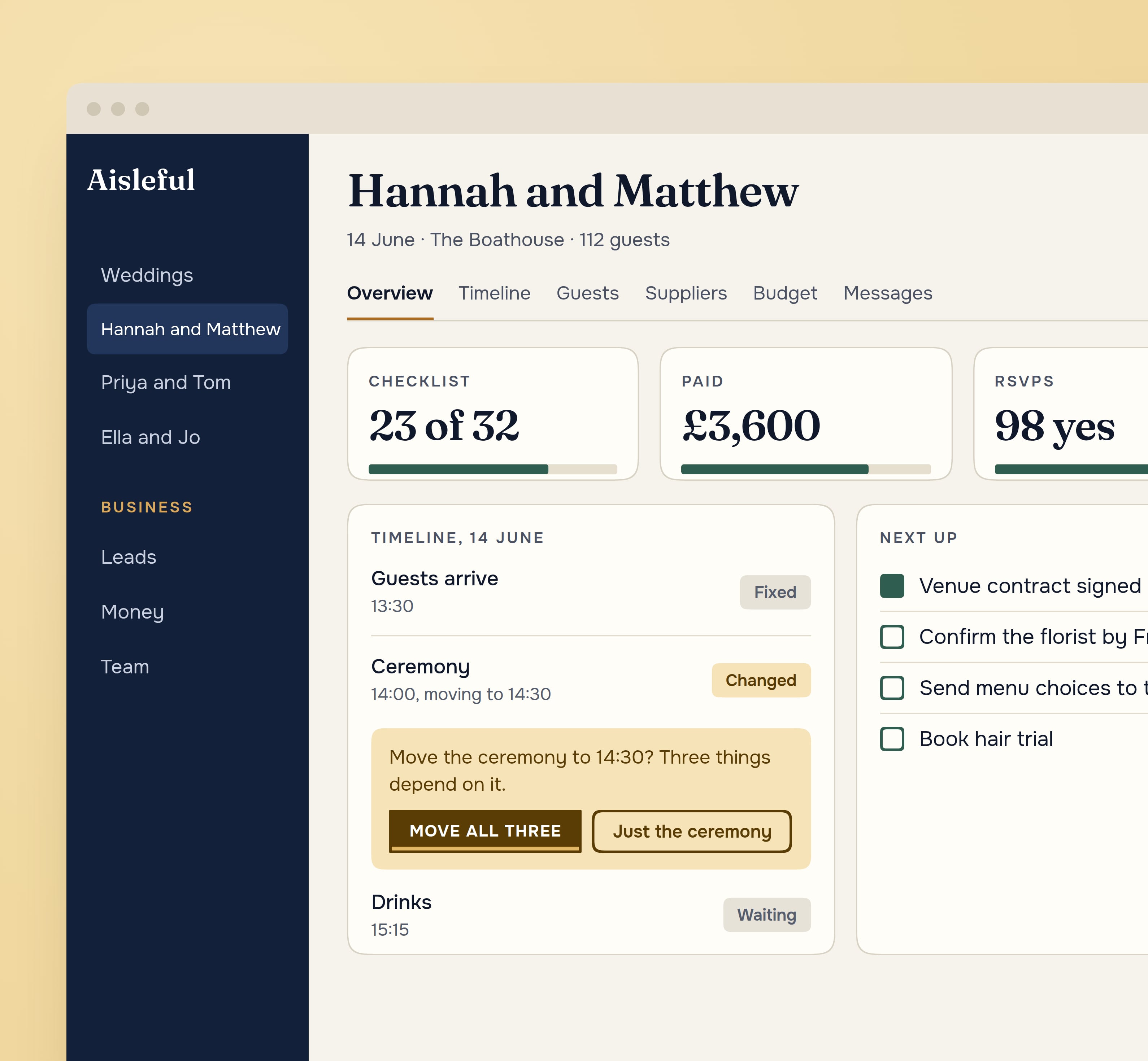
The Aisleful workspace for one wedding: checklist, payments, RSVPs, and the timeline asking whether to move three things that depend on the ceremony

Months of planning

A timeline that asks before it moves things.

Start from a template: full planning over 12 or 6 months, partial planning, day-of coordination, destination or a short engagement. Move the ceremony and Aisleful asks whether to move what depends on it. Suppliers, tasks, guests, seating and the budget sit in the same workspace, and every change can be undone.

  • YouThe whole wedding in one place, and a table of every wedding you run.
  • ClientThe checklist and timeline you have chosen to share, kept up to date.

04 Every week

Every week in between

Every wedding you run, in one table.

Sort by date, progress, open tasks or balance. Filter by planner or planning stage, and save the view. The couple, meanwhile, logs in to their own portal and sees only what you share: the checklist, the timeline, suppliers, the budget, documents, questionnaires and messages.

  • YouFewer “where are we with the florist?” messages to answer.
  • ClientA calm view of progress, with a way to reply that is not a group chat.

05 The day

The day

Day-of mode, built for one hand.

What is happening now, what is next, and a Call button for whoever is late. Tap Done, or push an item back five or fifteen minutes, and Aisleful asks whether what follows should move too. The same plan you built, without opening six documents.

  • YouThe running order and every supplier’s number in your pocket.
  • ClientA day that runs to a plan they have already seen.

06 After

The weeks after

The thank-yous, and the photos the guests took.

Send the thank-yous from the same place you planned the wedding. Guests add their photos and video through their own page, with nothing to install, and the couple keeps them. Then archive the wedding: nothing is deleted, and its place is free for the next booking.

  • YouA closed file, and room for the next booking.
  • ClientA gallery of the day from every angle, and a planner they will recommend.
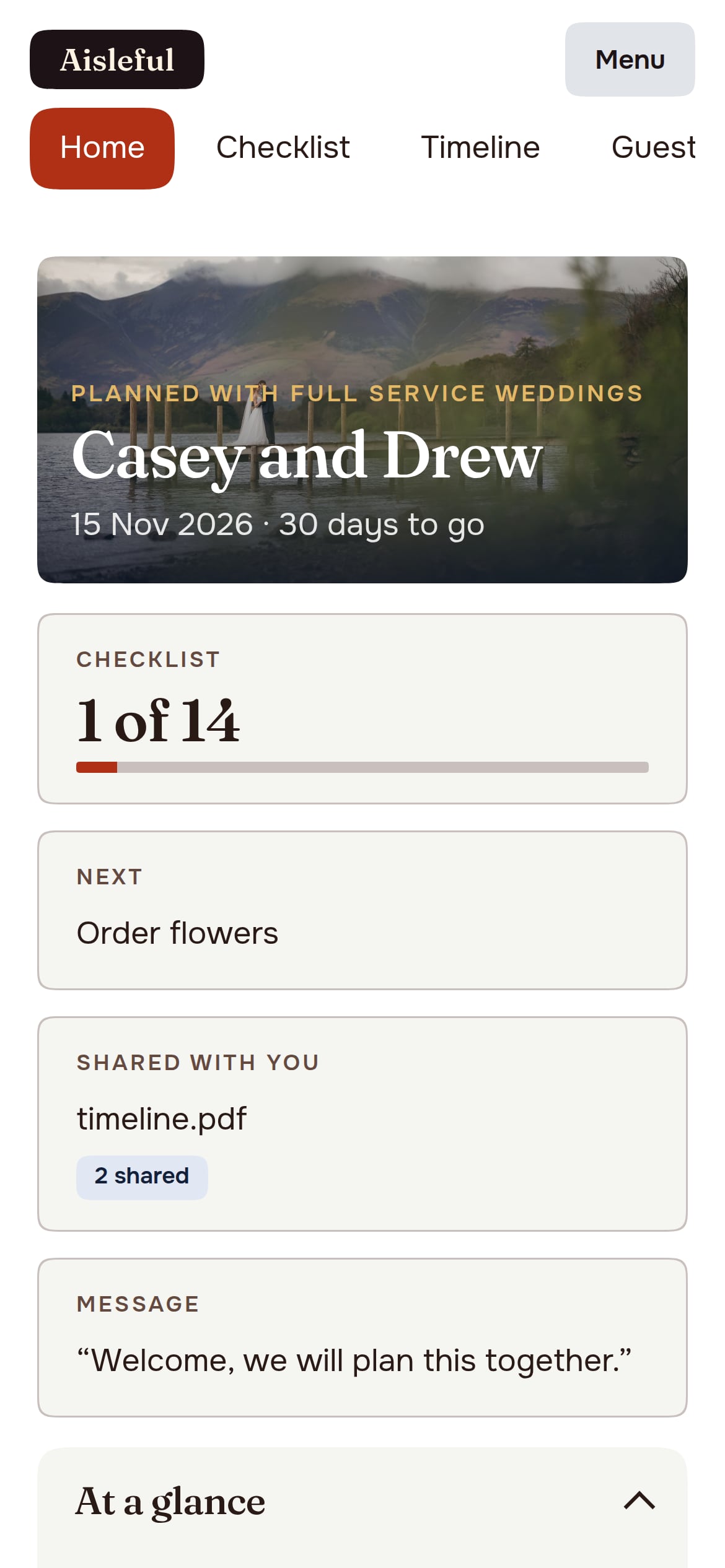
The couple's own login on a phone: their wedding, checklist and days to go, under the planner's business name

Their view. Your business.

A planner sells trust. Each couple gets their own login to a portal that shows someone is on top of it, without handing over your working notes or your other clients.

Start free

What you keep to yourself

  • Private notes on the couple, the families and the suppliers.
  • Your other weddings. Each couple sees only their own.
  • Your pricing, margins and the reports on your workload and money.

What you choose to share

  • The checklist, timeline and supplier list, as they stand.
  • Budget, documents and questionnaires, one item at a time.
  • Messages, and a gallery from the day when it is over.

Day-of mode · 14 June

  1. 12:00Photographer arrivesDone
  2. 13:30Guests arriveDone
  3. 14:30CeremonyHappening now
  4. 15:15Drinks reception
  5. 17:00Wedding breakfast

Priced by weddings at once.

Every plan has every feature, including leads, proposals, payments, the client portal and guest photos. You pay for how many weddings run at the same time. 3 months free, no card to start, then add payment to keep your weddings and client data.

Solo

£19a month

2 weddings at once

Everything above, for a planner starting out or working alone.

Choose Solo

Studio Most chosen

£39a month

5 weddings at once

Everything above, plus groups, tags, saved views and the project overview.

Choose Studio

Pro

£69a month

10 weddings at once

Everything above, plus the cross-wedding dashboard, bulk project status and client records.

Choose Pro

Agency

£129a month

25 weddings at once

Everything above, plus team members with roles, your own name, logo and domain, and reports on workload, leads and money.

Choose Agency

A finished wedding can be archived to free its place, and nothing in it is deleted. Need more at once? Add 5 weddings for £25 a month, 10 for £45 or 25 for £90.

Before you start.

What happens when the free months end?

You add payment to keep your weddings and your client data. Until then you do not need a card.

How do my clients get in?

You invite them by email. They set a password and see their own wedding in the portal, and only the parts you have shared.

Do guests need an app?

No. Guests open a link or scan a QR code in their phone’s browser, pick their name and upload their photos. Nothing to download and nothing to sign up for.

Can I put my own name on it?

On the Agency plan, your name, logo and domain replace Aisleful for your clients.

Is the guest photo gallery included?

Yes. Every planner plan includes Memories, so each wedding you run can collect its guests’ photos and video.

What if I go over my plan's weddings?

Nothing is deleted or hidden. You cannot start another wedding until you archive a finished one, add capacity or move to a bigger plan.

Run your next wedding in one place.

Start free 3 months free, no card